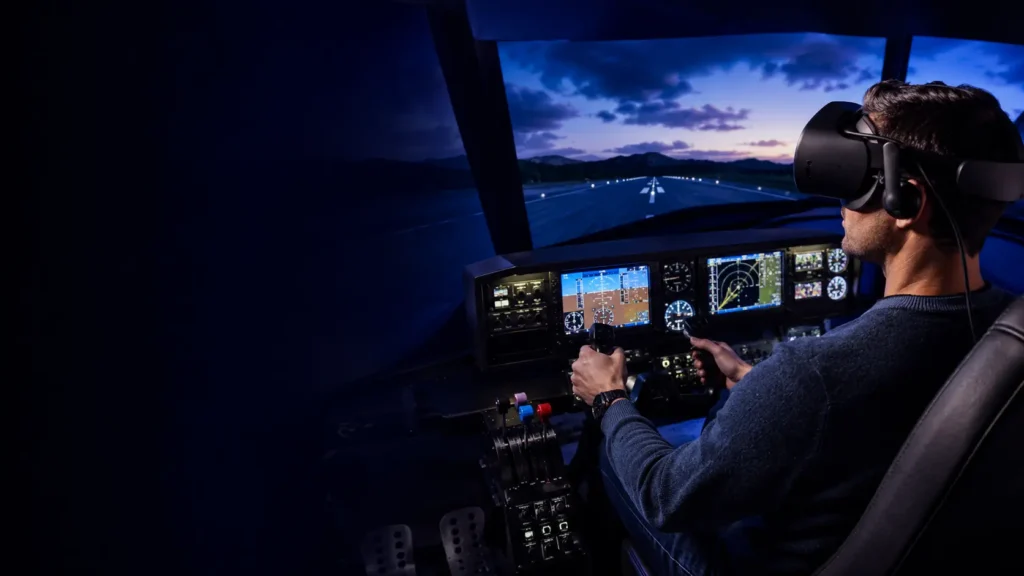
Updated September 2026. Flight simulation is one of the best reasons to own a VR headset. Instead of looking at a cockpit through a monitor, you can turn naturally towards the runway, lean towards an instrument and judge height and distance in three dimensions.
The challenge is choosing a headset that keeps cockpit text readable without asking more from your computer than it can deliver. For most people, the Meta Quest 3 is the best place to begin. The Pimax Crystal Light is a sharper dedicated-PC option, the Pimax Crystal Super targets maximum detail and field of view, and the featherweight Bigscreen Beyond 2 is built for long sessions.
This UK buyer’s guide explains the genuine differences, the extra equipment each headset needs and which option makes sense for Microsoft Flight Simulator 2024, DCS World and X-Plane 12.
Best VR headsets for flight simulation: quick answer
| Headset | Best for | Main strength | Important drawback |
|---|---|---|---|
| Meta Quest 3 | Most first-time VR pilots | Clear lenses, simple tracking and strong overall value | PC image is streamed rather than sent through native DisplayPort |
| Pimax Crystal Light | Dedicated PC flight simulation | Very sharp 2880 × 2880-per-eye image | Heavier and considerably more demanding than Quest 3 |
| Pimax Crystal Super | Maximum cockpit detail and peripheral view | Extremely high resolution and a very wide field of view | Premium cost and serious PC requirements |
| Bigscreen Beyond 2 | Long flights and minimum headset weight | Only 107g with dual micro-OLED displays | SteamVR base stations are an additional requirement |
Our recommendation in one sentence
Choose Quest 3 for the easiest and best-value introduction, Crystal Light for a sharper dedicated-PC setup, Crystal Super when cockpit clarity and field of view matter more than cost, or Beyond 2 when comfort is the deciding factor.
1. Meta Quest 3 — best for most flight-sim beginners
The Quest 3 is our best all-round starting point because it combines good optical clarity, inside-out tracking and flexible PC connectivity. Its pancake lenses give a broad clear area, which is especially useful when your eyes move between the windscreen, primary flight display and controls around the cockpit.
Meta specifies 2064 × 2208 pixels per eye and a headset weight of 515g. It connects to a suitable PC through a compatible Quest Link cable or wirelessly over a well-configured network. The headset tracks itself, so you do not need base stations around your simulator.
Why it works well for flying
- Pancake optics keep more of the instrument panel clear when you glance around.
- Inside-out tracking makes installation straightforward around a desk or fixed cockpit.
- Wired and wireless PC options suit both permanent and occasional setups.
- It can also run standalone VR applications when you are not flying.
- A large accessory market makes straps, facial interfaces and prescription lenses easy to find.
What to know before buying
Quest PCVR uses a compressed video stream rather than a native DisplayPort signal. With a good cable or fast dedicated Wi-Fi connection it can look excellent, but fine cockpit lettering may appear cleaner on a dedicated PCVR headset. The standard soft strap is not ideal for everyone, so include a better strap in the budget if you expect to fly for several hours.
Verdict: the safest first recommendation and the best choice when you want one headset for flight simulation and general VR.
Check the official Meta Quest 3 specifications
2. Pimax Crystal Light — best dedicated-PC value
The Crystal Light is designed for people who prioritise PC image quality over standalone applications. Pimax specifies 2880 × 2880 pixels per eye, glass aspheric lenses, refresh rates up to 120Hz and an approximately 110-degree field of view.
That resolution is valuable in a glass cockpit. Labels, navigation displays and distant runway detail can appear more defined than through a lower-resolution headset, reducing the urge to lean forwards every time you need to read a small number.
Why it works well for flying
- High per-eye resolution helps with gauges, avionics and distant scenery.
- A direct PCVR connection avoids the video compression used by standalone headsets.
- Inside-out tracking means SteamVR base stations are not essential.
- Local dimming on supported versions improves contrast in night flying and dark cockpits.
What to know before buying
The sharper display creates a heavy graphics workload. Microsoft Flight Simulator and DCS can challenge even expensive computers, so you may need to reduce render resolution, shadows, clouds or traffic. The headset is physically larger than Quest 3 and Beyond 2, making fit, balance and seating position important.
Verdict: a strong upgrade for a pilot who already owns a capable gaming PC and wants a dedicated flight-simulation headset.
Check the official Pimax Crystal Light specifications
3. Pimax Crystal Super — best for maximum cockpit clarity
The Crystal Super is the ambitious option for a high-end simulator. Pimax lists the Ultrawide version at 3840 × 3840 pixels per eye with a claimed 140-degree horizontal field of view. A wider view helps the cockpit feel more open and allows better peripheral awareness during circuits, formation flying and air combat.
Its very high resolution is aimed directly at the details flight simmers value: small flight displays, switches, distant terrain and aircraft contacts. It is also the headset most likely to reveal the limits of your computer.
Why it works well for flying
- Exceptional resolution for detailed instruments and scenery.
- Wide field of view creates a more natural sense of sitting inside the aircraft.
- Suited to premium yoke, HOTAS and cockpit installations.
- Designed for demanding PC simulation rather than casual standalone use.
What to know before buying
Do not assume that a top-end graphics card will run every simulator at the headset’s maximum resolution and settings. Upscaling and careful tuning may still be necessary. The total budget must also account for the computer and flight controls; buying a magnificent headset while flying with an unhappy PC is an expensive way to watch a slideshow.
Verdict: the enthusiast choice when maximum clarity and peripheral view justify the cost and performance demands.
Check the official Pimax Crystal Super information
4. Bigscreen Beyond 2 — best for comfort on long flights
Comfort matters when a short sightseeing trip turns into a three-hour airliner sector. Bigscreen lists the Beyond 2 at only 107g, with dual micro-OLED displays, 2560 × 2560 pixels per eye, pancake optics and a claimed 116-degree diagonal field of view.
The small form factor reduces heat and leverage on your face. For long-haul flying, repeated training circuits or an evening in DCS, lower weight can be more valuable than another impressive number on a specification sheet.
Why it works well for flying
- Exceptionally low headset weight for long seated sessions.
- Micro-OLED panels provide deep blacks for night flying.
- A wired connection suits a permanent simulator cockpit.
- SteamVR tracking is accurate and well established.
What to know before buying
The headset price is not the complete price. Compatible SteamVR base stations are required, and controllers are needed if you also want room-scale VR. Bigscreen’s fitting approach is more personal than a typical shared headset, which benefits the owner but is less convenient when several people use the same simulator.
Verdict: the comfort specialist for pilots prepared to build or expand a SteamVR system.
Check the official Bigscreen Beyond 2 information
What matters most in a flight-simulation headset?
Readable cockpit instruments
Flight simulators contain far more small text than most VR games. Resolution matters, but lens clarity matters just as much. A wide clear area lets your eyes move between instruments without forcing you to turn your whole head or lean towards the panel.
Stable performance
A smooth, consistent image is more comfortable and convincing than maximum visual settings with an unstable frame rate. Aircraft complexity, airports, traffic, weather and scenery can all affect performance, so leave some headroom rather than tuning the system only for an empty runway.
Field of view
A wider view increases the sense of being inside the aircraft and improves peripheral awareness. Manufacturer measurements use different methods, however, so treat field-of-view figures as a guide rather than comparing them as though they came from the same tape measure.
Comfort and weight
Pressure on the face, heat and front-heavy balance become obvious during longer flights. Strap design, facial interface, prescription-lens options and cable routing can matter as much as display technology.
Tracking around controls
Seated flight simulation does not normally require elaborate room-scale tracking. Inside-out tracking is sufficient for most desks and cockpits, although very dark rooms and large physical controls can occasionally affect camera tracking. SteamVR base stations remain necessary for headsets such as the Beyond 2.
How powerful does your PC need to be?
VR asks the computer to render a high-resolution view for each eye while a flight simulator calculates aircraft systems, weather, traffic and a large world. Both the processor and graphics card matter. The exact result also depends on the aircraft, airport and simulator settings.
| System level | Sensible headset target | What to expect |
|---|---|---|
| Entry VR-capable PC | Quest 3 | Moderate render resolution and carefully selected settings |
| Upper mid-range PC | Quest 3 or Crystal Light | Better clarity with some compromises at complex airports |
| High-end PC | Crystal Light, Beyond 2 or Crystal Super | Higher render targets, still requiring sensible tuning |
Do not buy by graphics-card name alone. CPU performance, memory, cooling, USB reliability and individual simulator updates all affect the experience. A stable frame time is more useful than an impressive screenshot.
Which flight simulators support VR?
Microsoft Flight Simulator 2024
The Windows PC version includes dedicated VR settings and lets you switch between the normal display and VR mode. Its world detail, weather and complex aircraft make it demanding, so use the simulator’s VR-specific graphics controls rather than simply copying monitor settings.
See Microsoft’s official VR settings guidance
DCS World
DCS is particularly convincing in VR because depth perception and natural head movement help with formation flying, air-to-air refuelling and looking through a turn. Detailed modules and busy missions can be demanding, while a proper HOTAS reduces the need to find a keyboard while wearing the headset.
Check the official DCS VR support information
X-Plane 12
X-Plane 12 supports VR on compatible PC hardware and is popular with pilots who value flight modelling and procedures. Confirm that any specialist aircraft, plug-ins and control hardware you rely on work correctly with your chosen VR runtime.
Read X-Plane’s official VR guidance
Do you need a yoke, joystick or HOTAS?
A VR headset provides the view, but physical controls provide the feel and repeatability. The right choice depends on what you fly:
- Airliners and general aviation: a yoke or joystick, throttle quadrant and rudder pedals make the largest difference.
- Military aircraft and space simulation: a HOTAS places the main controls under your hands without needing to see them.
- Helicopters: a precise joystick or cyclic arrangement, separate throttle or collective and pedals are particularly useful.
Arrange controls consistently so you can find them by touch. Start with the essentials before filling the room with replica switches. A reliable throttle and good rudder control usually improve flying more than a decorative panel that does nothing except impress the dog.
Wired or wireless for flight simulation?
Wireless freedom is less important when you remain seated at a fixed cockpit. A wired connection avoids battery concerns and reduces dependence on network quality. Route the cable behind or above the seat so it cannot snag on the yoke, throttle or chair.
Quest 3 still offers useful wireless PCVR when the router and room are suitable. For long flights and organised multiplayer sessions, many pilots will prefer the predictability of a cable.
Reducing discomfort and motion sickness
- Begin with short, gentle flights in a slower aircraft.
- Keep the frame rate stable before increasing visual quality.
- Use a fan to provide airflow and a physical sense of direction.
- Avoid aerobatics and rough weather until you are comfortable.
- Stop when you feel unwell rather than trying to push through it.
Most people adapt gradually, but comfort varies. Stable performance and a properly adjusted headset make an enormous difference.
Which headset should you buy?
- New to VR or unsure: Meta Quest 3.
- Dedicated PC pilot wanting sharper instruments: Pimax Crystal Light.
- Premium cockpit and powerful PC: Pimax Crystal Super.
- Long sessions and minimum weight: Bigscreen Beyond 2.
Before ordering, check prescription-lens options if you wear glasses, measure the ports available on your PC and confirm the requirements of your chosen headset. Specialist hardware prices, bundles and UK availability can change quickly.
Final verdict
The Meta Quest 3 is the best VR headset for most new flight-simulation users in 2026 because it combines clear optics, straightforward tracking and a manageable total cost. The Pimax Crystal Light is the logical dedicated-PC upgrade, while the Crystal Super targets pilots chasing maximum detail and peripheral view. Choose the Bigscreen Beyond 2 when comfort over long flights is the priority.
Whichever headset you choose, reserve part of the budget for PC performance, comfort and dependable physical controls. A stable image and a throttle you can find without removing the headset will improve every flight more than chasing the largest number on the box.
Explore more VR flight-simulation guides or compare our best VR headsets for sim racing.
Editorial note: Specifications and official compatibility information were checked in September 2026. Prices, availability and software support can change. This guide contains no paid placement; any future affiliate links will be clearly disclosed and will not affect our recommendations.